
Mobile communication principles
How Mobile Phones Work: Signals and Networks
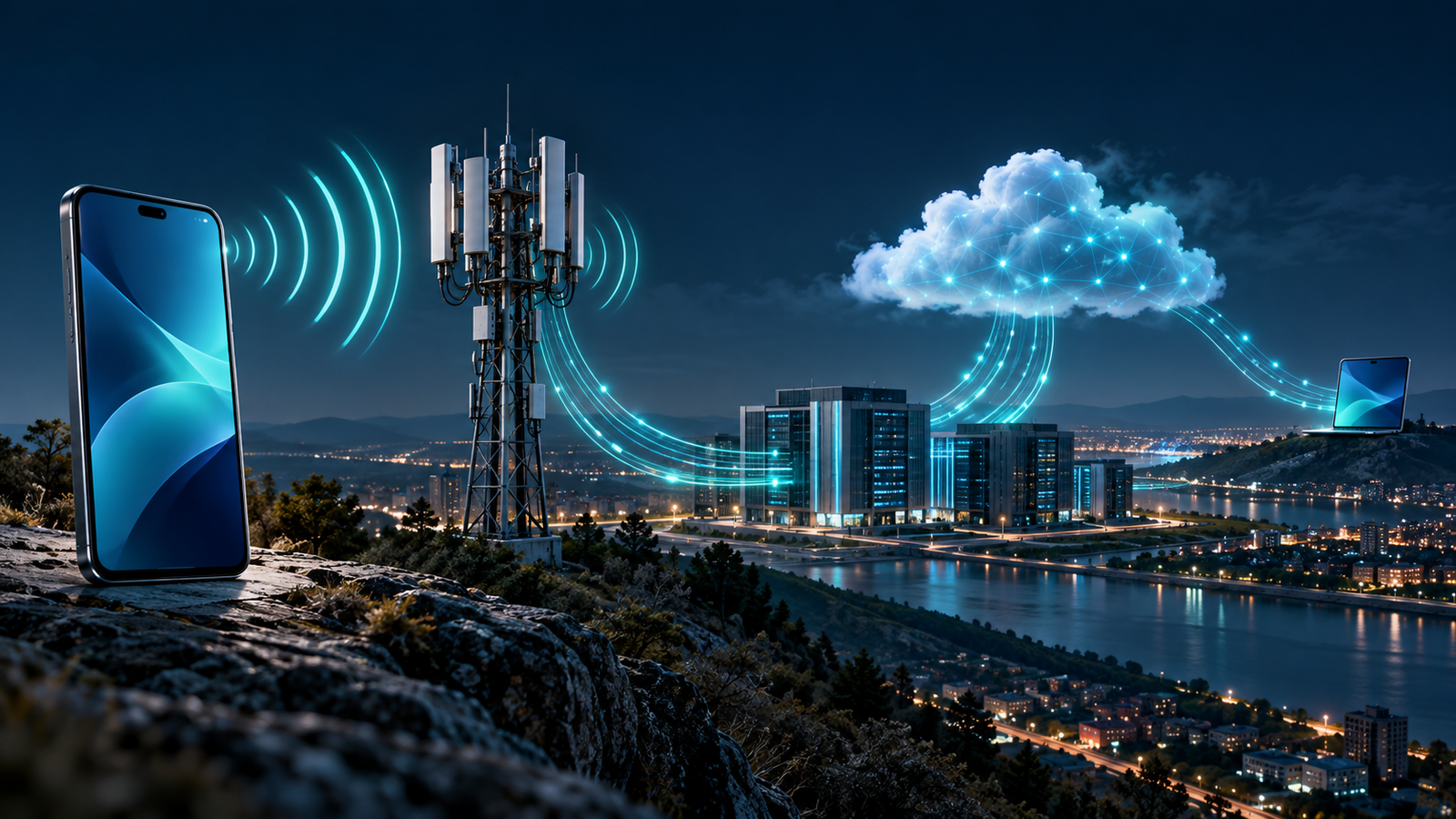
A cell phone is both a compact computer and a two-way radio. It processes voice, touch, photo and application data, converts the information into wireless signals, and exchanges signals with the appropriate cellular base stations. The operator network is responsible for verifying subscription identity and routing calls, messages and Internet data to the correct destination.
quick reference
Short answers to core questions
| question | short answer |
|---|---|
| What connects a phone to a mobile network? | A two-way cellular wireless link between a mobile phone and a compatible network device. |
| What is responsible for processing the information inside the phone? | Processors, memory, operating systems and specialized chips. |
| What is used to identify mobile subscriptions? | Secure subscription configuration in SIM or eSIM. |
| What carries the information after it leaves the base station? | Operator transmission network, core network and Internet network. |
| How to stay connected while on the move? | Network mobility management and handover between cells. |
| Can a mobile phone use Wi-Fi instead? | Yes, for use with local networks and supported internet services. |
Overview
The three major systems behind mobile phones
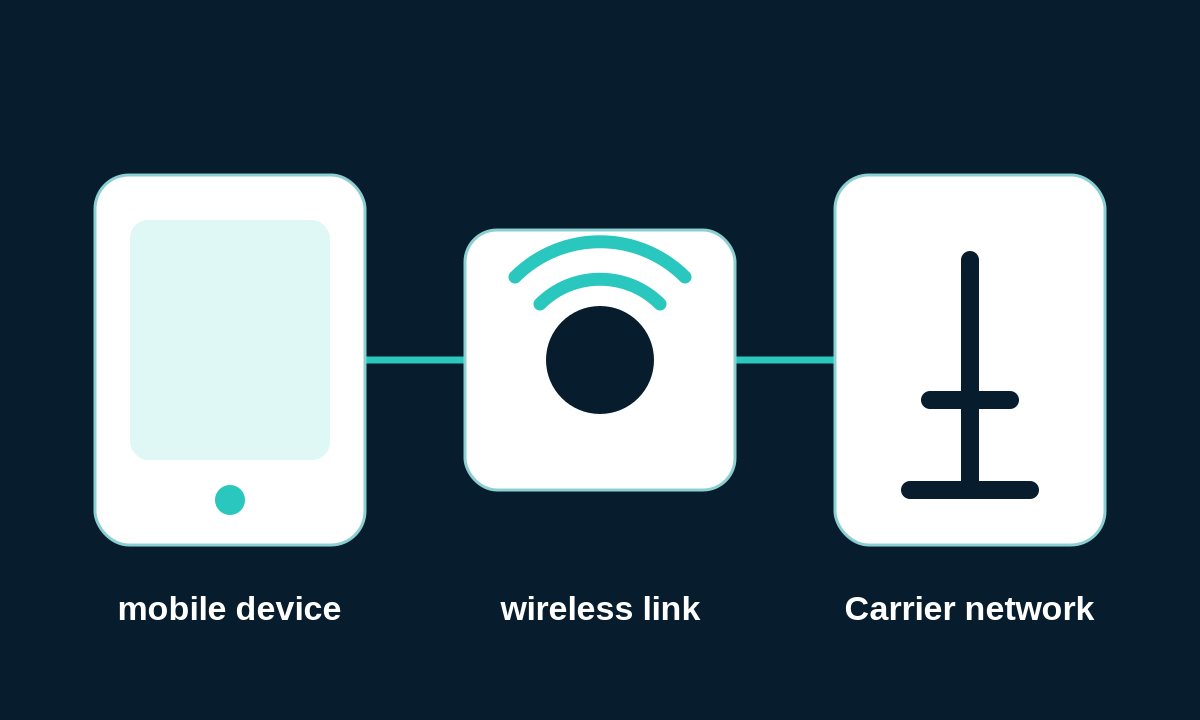
Mobile connectivity is only possible if devices, wireless links and the wider network work together. Each system performs different tasks, and problems occurring anywhere may affect the results you see on the screen.
- Equipment:Internal components are responsible for receiving input, processing information, saving files, and outputting results.
- Wireless connection:The RF hardware sends and receives encoded signals.
- Network:The infrastructure authenticates subscription identities and forwards communications.
This article will explain
- What happens when you turn on your phone.
- How your voice reaches another person.
- How messages and web pages appear on the screen.
- Why signal and connection speeds vary.
”Mobile phone” and ”cell phone” both refer to mobile phones in general. Smartphones add powerful operating systems, applications, sensors and more complete computing capabilities.
Washington State UniversityA simple explanation of how mobile phones workIt also introduces the relationship between equipment, wireless signals and base stations in a way that non-professional readers can understand.
Device hardware
What’s inside the phone?
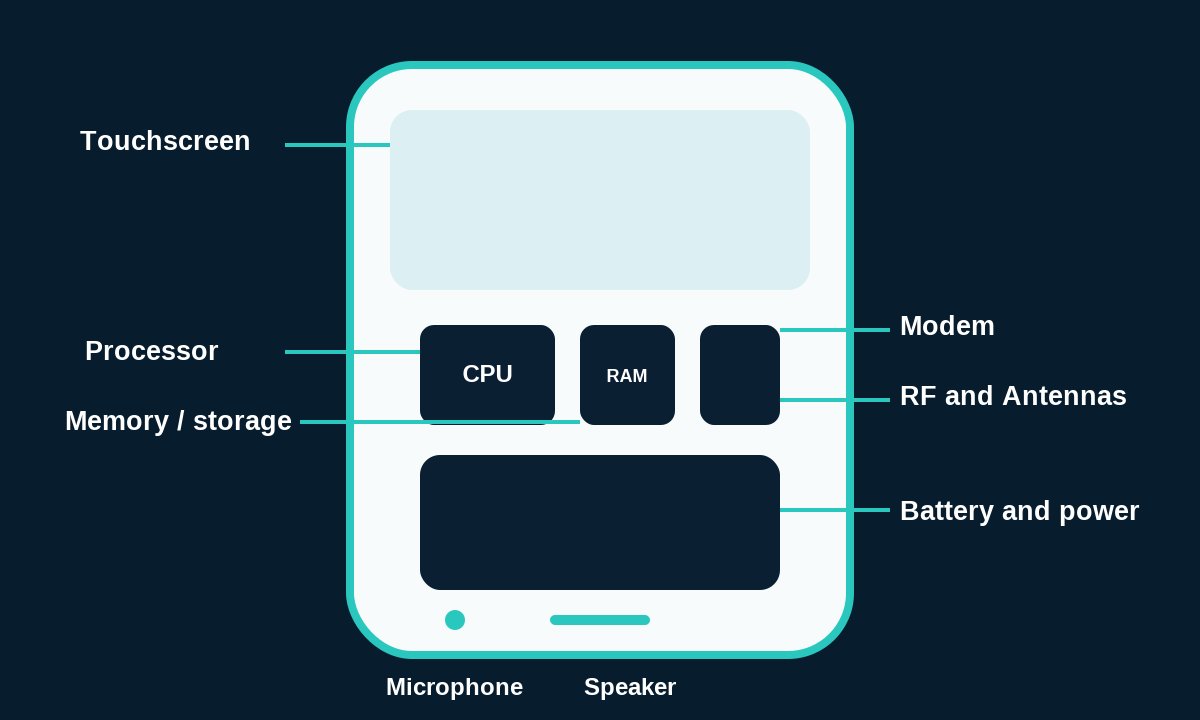
The phone’s applications processor runs the operating system, applications, graphics tasks, and most general computing. The cellular modem is responsible for the communication protocol: understanding network commands, preparing data to be sent, and decoding received data. Some mobile phones integrate these functions into the same system-on-chip, while some designs retain independent modules.
The operating system coordinates hardware access and provides applications with controlled camera, microphone, screen, storage, sensor and network interfaces, while managing power consumption and background activity.
| components | Main tasks | Everyday examples |
|---|---|---|
| Processor or SoC | Performs calculations and coordinates the main functions of the device. | Run the browser and work with the photos. |
| running memory | Stage data in use for quick access. | Allow multiple applications to be restored quickly. |
| Storage | Long-term storage of systems, applications and files. | Save photos and downloaded music. |
| cellular modem | Handles mobile network communications. | Sign up for LTE or 5G and transfer data. |
| RF circuits and antennas | Generate, filter, transmit and receive wireless signals. | Establish a connection via supported frequency bands. |
| Microphone and speakers | Converts between sound and electrical signals. | Collect voice and play the other party’s voice. |
| touch screen | Display output and sense touch input. | Display web pages and recognize clicks. |
| Battery and power management | Provides and regulates electrical energy. | Balance performance, charging and battery life. |
wireless link
How do radio waves carry voice and data?
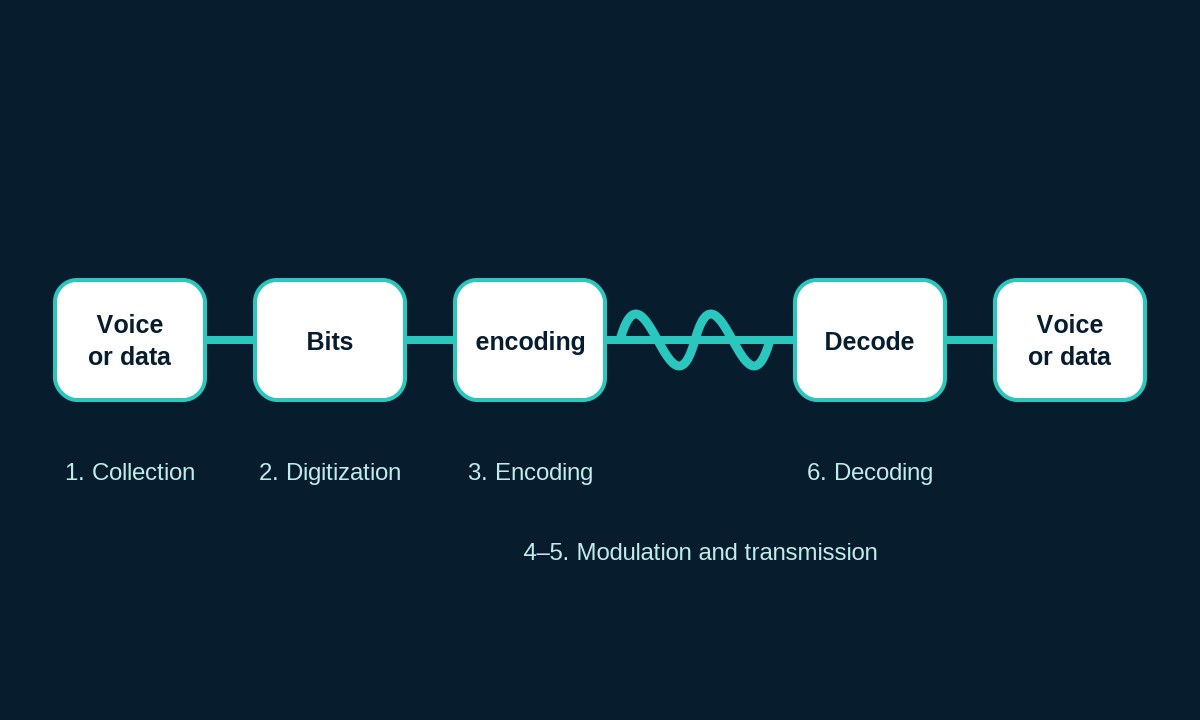
Radio frequency electromagnetic fields can carry information. asITU Guidelines for Mobile and Wireless EquipmentAs illustrated, a cell phone contains a low-power transmitter and receiver used to exchange wireless signals with network devices.
- Collect or generate information.Microphones collect sound, cameras collect light, and applications generate data.
- Convert to numeric form.The phone converts the content into numbers that can be processed bit by bit.
- Encoded for transmission.Error correction information and protocol information help the receiving end understand the data correctly.
- Modulate wireless signals.The transmitter changes the characteristics of the carrier signal in a prescribed manner to represent the information.
- transmitted through the antenna.Radio frequency circuits send prepared signals into the surrounding space.
- Receive and decode.The antenna and receiver at the other end recover the information, check it and continue the transmission.
Bits are not physical numbers flying through the air, but are represented by controlled changes in signals. Modulation is about creating these changes in the way agreed upon by both parties, without requiring the reader to understand complex formulas first.
Frequency
The number of times a wave repeats per second that the network operates within its assigned frequency range.
Bandwidth
The spectrum width that a signal can occupy is not the same concept as frequency.
Upward
Information sent from mobile phone to network.
Downward
Messages sent from the web to your phone.
delay
The time it takes for a message to be delivered or to get a response.
Throughput measures the amount of valid data arriving over a period of time, and latency measures waiting time. So even if download throughput is high, it may still feel sluggish when it starts to load if latency is high.
Online registration
How does a mobile phone connect to a cellular network?
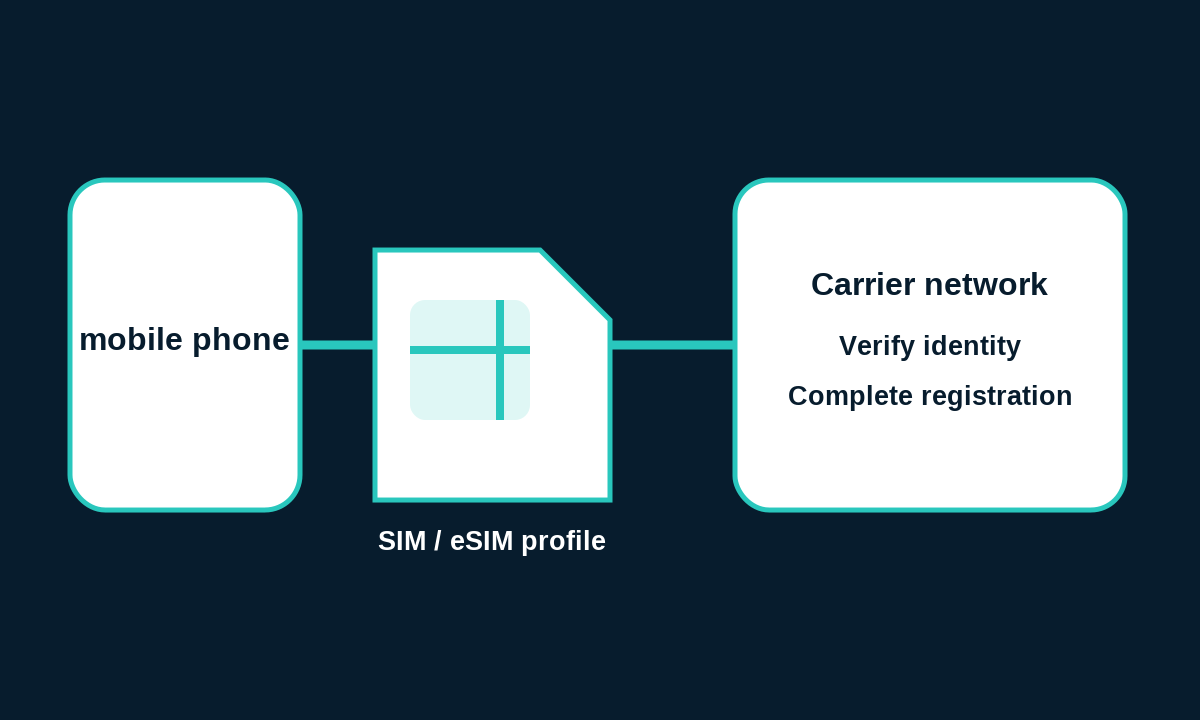
When the phone boots up, the modem checks for supported bands and listens for available networks. It does not simply select the base station with the closest physical distance, but selects the network and appropriate cell that allow access based on wireless conditions, operator settings, roaming rules, device capabilities and network priority.
- Discover the web.The mobile phone reads the received cell broadcast information.
- Select a network and community.Choose the appropriate one from supported and allowed options.
- Verify subscription.Security credentials in SIM or eSIM support the challenge and response process.
- Complete registration.The network records that this subscription is currently available within the corresponding service area.
- Establish a connection.The network provisions supported voice, messaging and data services based on subscription.
| point of comparison | Physical SIM | eSIM |
|---|---|---|
| common use | Provides secure subscription identity. | Provides secure subscription identity. |
| Configuration delivery method | Configuration is provided with the card issued by the operator. | Download the configuration through a supported provisioning system. |
| Do you need detachable cards? | Need to insert SIM card slot. | No, the security component is already embedded in the device. |
GSMA’s eSIM descriptionIntroduces remote digital provisioning of compatible devices. Neither SIM will boost the signal or store the user’s data credit. Subscription identities are also different from IMEIs, which identify the device rather than the user account.
Proper use of the service also depends on supported frequency bands, operator compatibility, coverage, subscription status, and sometimes device software configuration. Authentication for cellular connections cannot be completed with just a mobile phone number.
Two-way voice
What happens when you make a mobile phone call?
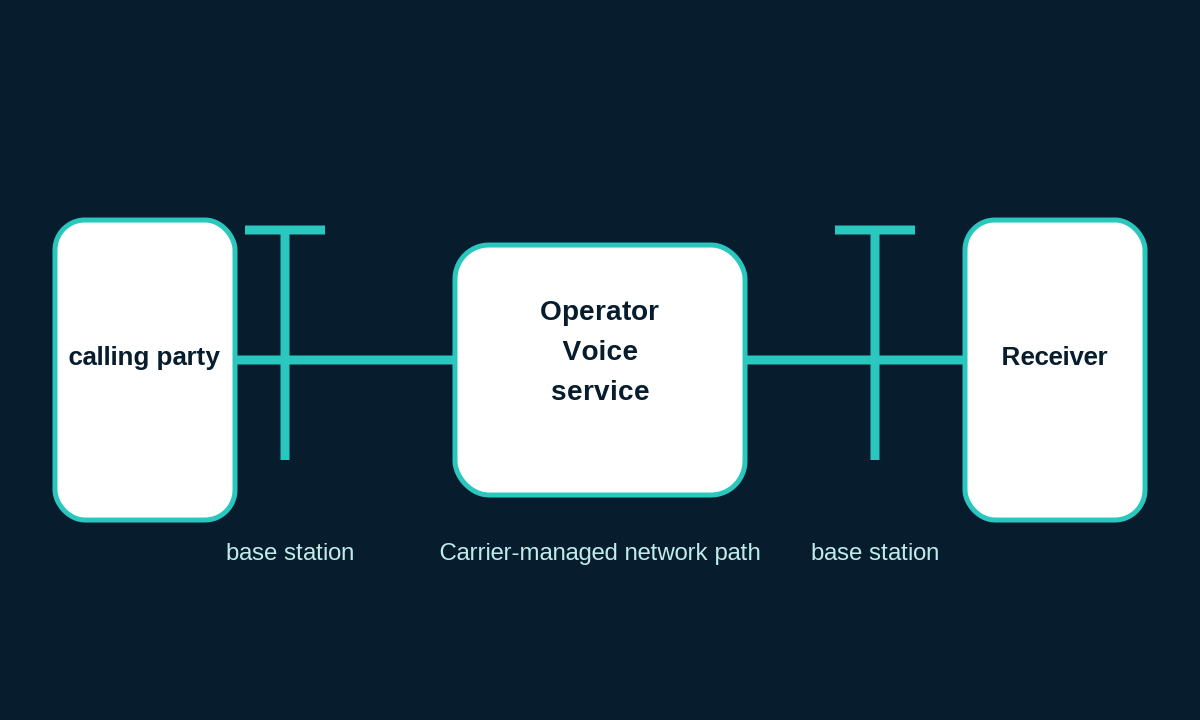
Ordinary mobile phone calls typically use terrestrial wireless access and carrier infrastructure rather than satellite. Only the portion of the link between each phone and the serving network equipment is wireless; the bulk of the transmission in between may pass through fiber optics, microwave backhaul, switches, routers, gateways, and interconnection carrier networks.
- User initiates a call.The mobile phone sends the call request through the registered network service.
- The network looks for and alerts the recipient.The network forwards the request and is paged in the area in which the receiving device is currently registered.
- The microphone collects speech.It converts air pressure changes into electrical signals.
- Mobile phone converts and compresses audio.Speech codecs efficiently represent sound as digital information.
- Wireless and network facilities carry information.The encoded voice travels through wireless links, operator systems and required internetwork.
- Receive phone restore audio.The device examines, decodes and converts the data into an audio signal.
- Speakers produce sound.The speaker converts the electrical signal back into changes in air pressure.
During a call, the same process runs in both directions at the same time. Although speech is processed into smaller units of data, network timing and buffering mechanisms help the conversation remain coherent.
| Calling method | working method | Important conditions |
|---|---|---|
| circuit switched voice | Older 2G or 3G systems reserved dedicated network paths for calls. | Rely on the old network still available. |
| VoLTE | Operator-managed voice uses LTE packet networks and IMS services. | Phone, software, SIM and carrier configuration must match. |
| VoNR | Operator-managed voice is carried through 5G NR and 5G core network. | Need to support independent networking 5G voice. |
| Wi-Fi calling | Supported carrier voice comes into carrier service over a suitable Wi-Fi connection. | Availability and behavior depend on device and operator. |
Ericsson VoLTE InstructionsIntroducing operator managed IP voice over LTE,5G voice instructionsThis section introduces VoNR and voice continuity solutions. These carrier voice services are different from third-party calling apps that work over a regular internet data connection.
Which method a call actually takes depends on the phone, carrier, coverage and current registration status. Even if the phone’s data connection says 5G, voice may still be using VoLTE, so the 5G icon isn’t proof that the call is using VoNR.
digital services
How do SMS and mobile internet work?
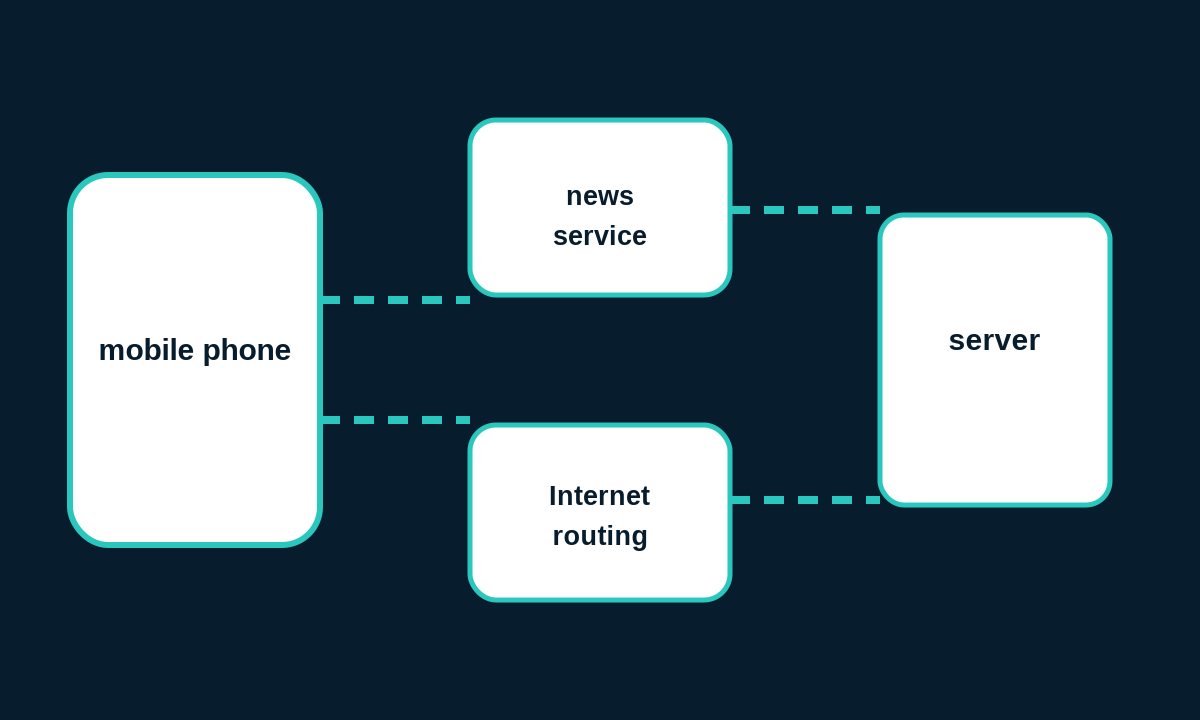
”Messaging” consists of multiple services with different network paths and security designs. SMS is a short text service provided by operators; MMS adds multimedia through operator systems; RCS provides richer operator messages in supported environments; Internet messaging applications communicate with their own service infrastructure through data connections.
| service | Carrying content | Connection or service requirements |
|---|---|---|
| SMS | Short text and signaling messages. | Compatible cellular text messaging services. |
| MMS | Images, audio, video and longer content. | Operator MMS configuration and appropriate network access. |
| RCS | Rich media chat, receipts, and group functionality. | Supported clients, carrier systems and data connections. |
| Internet messaging application | Text, media, calls, and files defined by the application. | Internet and service provider systems; encryption methods vary. |
Opening a web page follows a different process:
- The browser prepares a request for a specified online resource.
- The phone sends the request over the current cellular or Wi-Fi connection.
- The network infrastructure forwards the request to the server.
- The server returns the page file and data.
- The browser interprets the files and assembles them into visible pages.
Networks break data into packets, which can be thought of as addressed envelopes containing numbered file segments. The router redirects the packet to its destination, and the receiving system assembles the useful content. Different packets may take different paths, but they don’t have to.
Downloading is the movement of data to the phone, such as receiving a video; uploading is data leaving the phone, such as backing up photos or sending voice from an app call.
Coverage and mobility
Why are mobile networks divided into cells?
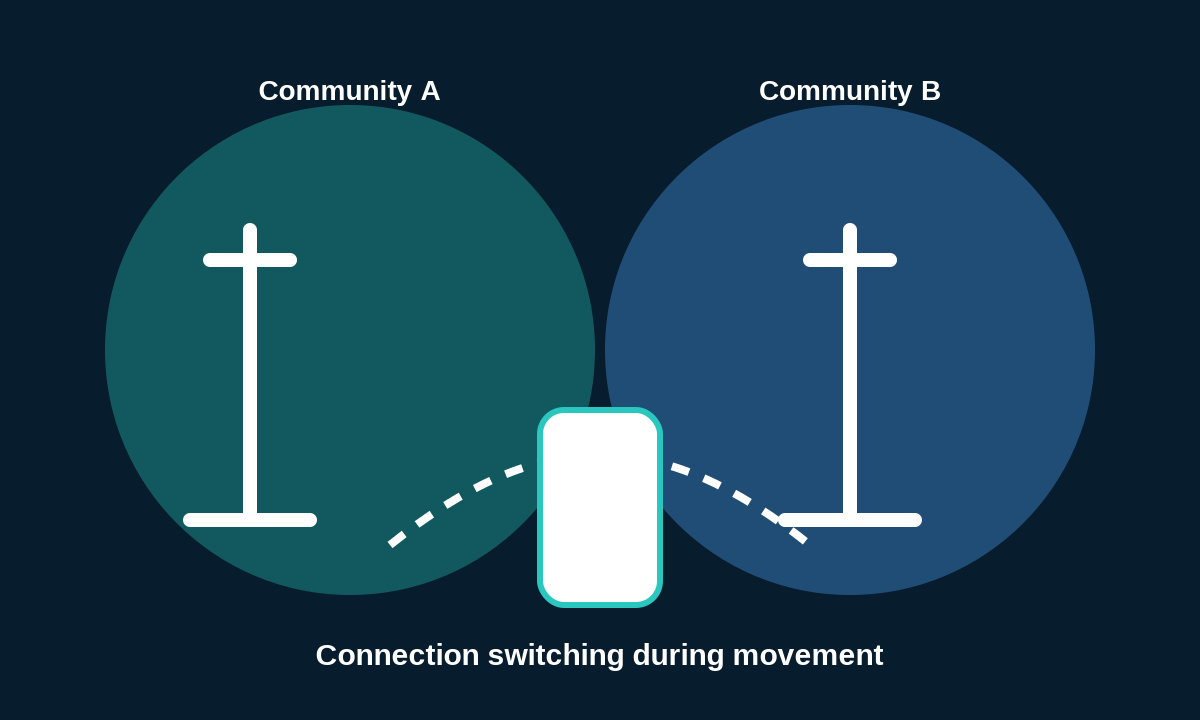
Cellular networks divide the service area into many wireless coverage areas, which are called cells. Each cell is served by network equipment and antennas. A real cell is affected by terrain, architecture, antenna direction, frequency, transmit power, interference and network planning, and its shape is irregular, let alone a perfect hexagon.
- Coverage:Areas where available services are received.
- Capacity:How much traffic and active devices can a cell carry.
- Interference:Untargeted energy that makes useful signals more difficult to identify.
- Frequency reuse:Controlled reuse of the same spectrum in separate cells.
Cellular structures allow operators to reuse limited spectrum and add capacity locally. Antennas may be mounted on large towers, rooftops, poles, indoor systems or compact small cells.ITU GuidelinesThese different installation forms are also illustrated.
A switch in urban mobility
- When a passenger starts a call, the phone uses a serving cell.
- While the vehicle is moving, the mobile phone and network continuously monitor relevant wireless measurement data.
- The original connection gradually becomes unsuitable and another supported cell becomes a better option.
- The network prepares resources and instructs the phone to change service connections.
- Voice sessions continue through the new cell and legacy operator service paths.
The network considers wireless conditions, load, policy, mobility status and available technologies rather than just selecting the nearest antenna. Handoffs are designed to maintain service, but calls may still be interrupted if coverage gaps, interference, congestion, or compatibility issues arise.
Network evolution
What changes have occurred from 1G to 5G?

Mobile communication generations describe an important development stage of standards and network capabilities and do not guarantee a fixed speed. Multiple generations can provide services simultaneously.IEEE Technology Navigator Cellular Network OverviewProvides access to further relevant technical literature.
| intergenerational | major developments | Typical service |
|---|---|---|
| 1G | Simulate cellular voice. | Basic mobile phone. |
| 2G | Digital voice and more efficient wireless systems. | Voice, SMS and limited packet data. |
| 3G | More capable packet data access. | Web pages, email, maps, and early mobile video. |
| 4G | Mobile broadband and all-IP packet network fundamentals. | HD video, cloud applications and VoLTE. |
| 5G | Greater capacity, flexible spectrum and low latency capabilities. | Enhance broadband and diversify consumer and industrial services. |
Actual performance depends on deployment, spectrum, coverage, congestion, backhaul and equipment capabilities. Low frequencies usually have wider coverage and are more advantageous in penetrating obstacles; in locations with dense infrastructure and suitable propagation conditions, wide channels in high frequency bands can bring considerable capacity.
Radio waves do not travel faster because they have a higher frequency. 5G can use a variety of spectrums such as low frequency, medium frequency and higher frequency, which is not equivalent to millimeter wave. Theoretical maximums describe controlled targets or peak conditions and do not represent the average user’s daily speeds.
Not just cellular
What are the differences between Cellular, Wi-Fi, Bluetooth, NFC and GPS?
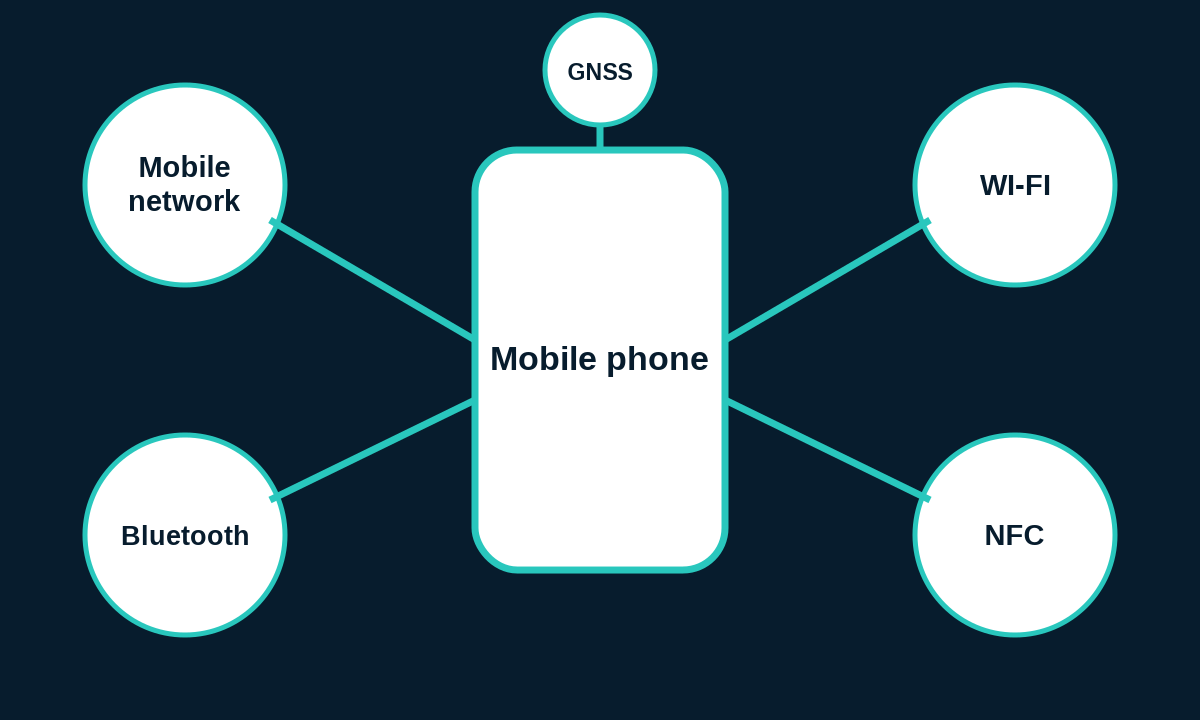
Smartphones come with a variety of radio systems, as no single technology is suitable for all ranges, power consumption, service modes and tasks at the same time. The operating system can use multiple connections in parallel while keeping their purpose clear.
| technology | Main purpose | connection object | Common examples |
|---|---|---|---|
| cellular network | Wide area mobile communications. | Operator wireless access network and core network. | Make calls or browse the web on the move. |
| Wi-Fi | Local network access. | Nearby access point or router. | Use your home or office network. |
| Bluetooth | Short distance accessory and device connections. | Nearby supported devices. | Wireless headphones or car stereo. |
| NFC | Extremely short range identification and data exchange. | Compatible with card readers, tags or devices. | Pay contactless or read tags. |
| GPS/GNSS | Positioning and timing. | Signals from navigation satellites. | Calculate phone location. |
The Wi-Fi icon indicates that there is a local wireless link between the phone and the access point, but does not guarantee that the access point can access the Internet. Bluetooth is usually used to connect accessories over short distances; NFC has a shorter working distance and is suitable for interactions that involve intentional proximity.
GNSS receivers use satellite signals to calculate position, and mapping applications also require map content. During a journey, the mobile phone may use GNSS positioning, use cellular data to obtain real-time traffic conditions, use Wi-Fi at the station, use Bluetooth to connect headphones, and pay via NFC. Offline maps can separate basic navigation from downloading new map data.
Daily troubleshooting
Why does my phone lose signal or slow down?

Signal strength describes the condition of the wireless link; network capacity describes how much shared traffic the system can carry. The two are related but cannot replace each other, so a full signal may also be accompanied by slow downloads.
| phenomenon | Possible reasons | simple check |
|---|---|---|
| Indoor signal is weak | Walls, coatings, building depth, or frequency band propagation characteristics weaken the signal. | Move closer to a window or move to a more open location. |
| There is a signal grid but the data is slow | The cell is congested, has limited capacity, or the backhaul is busy. | Try again later and check carrier service status. |
| Interrupted call on the move | Handover failed or coverage gap passed. | Record location and compare services at rest. |
| Limited service while traveling | Differences in roaming, frequency bands, account settings or device compatibility. | Check plans, frequency bands and carrier support. |
| Wi-Fi is strong but unable to access the Internet | The local link is normal, but the upstream connection to the router is down. | Test other websites or devices and check your router. |
No one switch can solve all connection problems. It’s reasonable to check coverage and failure information, move to a less obstructed location, restart stuck connections where appropriate, and check device model, frequency band, subscription and carrier compatibility.
Use offline
What else can a cell phone do when there is no mobile service?
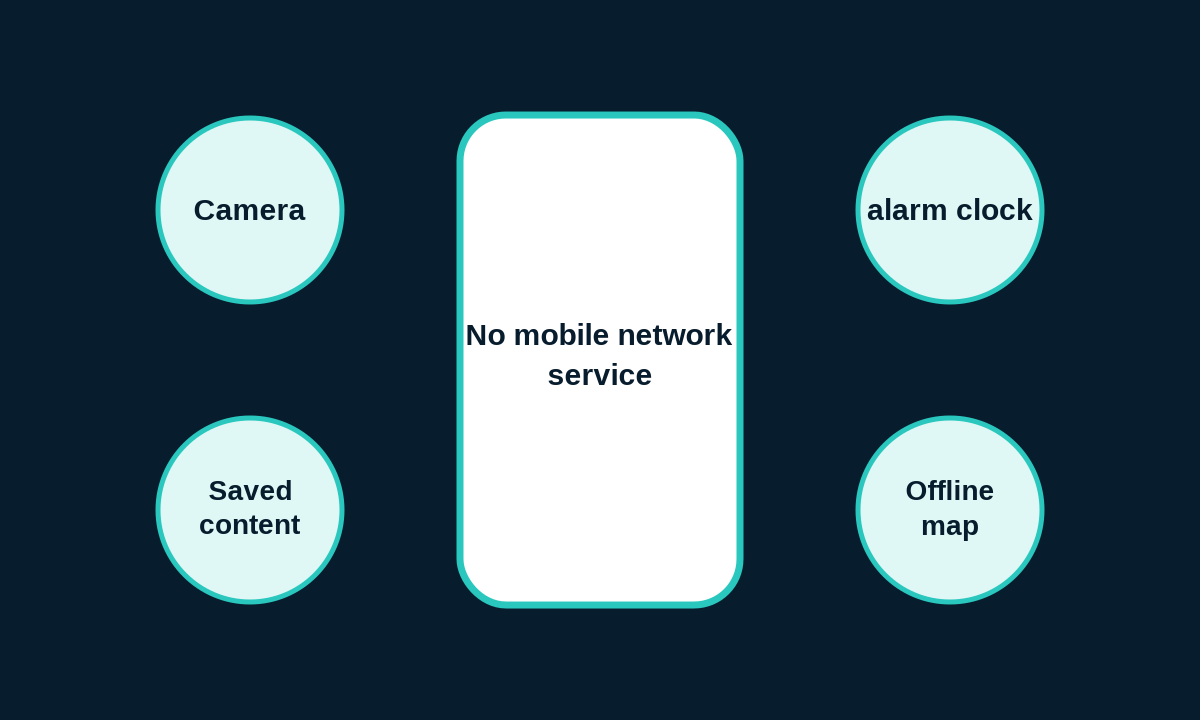
Can work offline
- Take photos and view local photos
- Alarm clock, calculator and notes
- Downloaded music, videos, and documents
- Compatible offline maps and GNSS positioning
Still needs proper connection
- Open a new webpage and sync with the cloud
- Live traffic and online map search
- Operator calls and messages under subscription
- Internet calling and streaming services
Wi-Fi can restore many internet services when there is no cellular coverage. But that doesn’t mean all calling will work without a subscription; carrier Wi-Fi calling still requires specific device, account, and carrier support.
Frequently Asked Questions
Frequently Asked Questions About How Cell Phones Work
Get a quick overview of frequently asked questions about network, calling, SIM, mobile data and location.
Will mobile phones communicate directly with each other?
Usually not. In ordinary cellular services, each mobile phone first connects to the operator’s network through wireless signals, and then the network forwards calls, messages or data to another user. Bluetooth, Wi-Fi Direct, or NFC can allow nearby devices to connect directly, but these local connections are not like regular carrier calls.
Do cell phone calls go through satellite?
Most mobile phone calls use terrestrial cellular networks: the phone connects to a suitable nearby base station and is then transmitted onward by terrestrial operator infrastructure. Some new devices support limited satellite messaging or calling, but this is a standalone feature that requires specific equipment, service, open sky views and regional support.
Can the phone still work without a SIM card?
Yes. The camera, alarm clock, downloaded files, offline apps, and Wi-Fi functionality generally still work. Subscription cellular voice, SMS and mobile data generally require a valid physical SIM or eSIM profile. Emergency calling capabilities vary by device, network, region, and local rules.
What is the difference between SIM and eSIM?
Both provide secure subscription configuration to assist operators in authenticating services. The physical SIM saves the configuration in a removable card; the eSIM saves the downloadable configuration in the device’s built-in security component. The main difference is the activation method: one requires a card, the other is activated digitally on a compatible device and network.
How does the network know where to send an incoming call?
Registered mobile phones will update their currently reachable service areas or cell groups to the network. When an incoming call is received, the network pages the device in the relevant area. This process does not require the operator to continuously obtain the phone’s precise GPS coordinates.
Why is the Internet still very slow even though the signal is full?
The signal grid mainly reflects the wireless reception situation and does not indicate whether the shared network capacity is sufficient. Cell congestion, interference, limited spectrum, slowed backhaul, traffic management, or target servers can all slow down speeds. Therefore, a strong signal is good for a wireless link but does not guarantee high throughput or low latency.
Is 5G necessarily faster than 4G?
uncertain. 5G has higher performance potential, but actual experience depends on spectrum, channel width, coverage, network architecture, congestion, backhaul and handset capabilities. Good 4G may be faster than weak coverage or congested 5G. The 5G icon only reflects the access status, not the speed guarantee.
Will turning off mobile data stop phone calls?
uncertain. Mobile data switches often prevent regular apps from accessing the internet over cellular networks. Operator-managed voice services such as VoLTE or VoNR can be handled independently by the device and operator. Specific behaviors vary, and third-party calling apps still require Wi-Fi or other data connections.
Does GPS require internet?
GNSS receivers can calculate position based solely on satellite signals, no mobile data is required. The Internet speeds up first fixes with auxiliary data and is often used to download maps, live traffic, search results or updated routes. Pre-downloaded offline maps support navigation when there is no cellular connection.
Are regular mobile phone calls end-to-end encrypted?
Operator networks will use security mechanisms for connections such as wireless links, but ordinary mobile phone calls cannot automatically be called end-to-end encrypted. End-to-end encryption is an application design in which only the two ends of the communication can decrypt the content. Whether it is available depends on the actual call service used.
Summary
Click on the screen to connect to the network
- Mobile phones process information through hardware and operating systems.
- RF hardware generates and receives controlled wireless signals.
- Mobile networks authenticate and connect user subscriptions.
- Network infrastructure forwards calls, messages and data.
- Wi-Fi, Bluetooth, NFC and GNSS each support different tasks.
After understanding this complete link, whether you are making a call, opening a web page, or suddenly losing signal indoors, it will be easier to determine which part is working.
Reader questions
Have questions about cell phones?
You can describe issues with your mobile device, your internet connection, or the content of this article. It is recommended to provide relevant device and network background to help us understand the specific situation, but please do not fill in passwords, SIM security credentials or other sensitive account information.
Related Reading
View more mobile technology guides
Only articles that have been published and confirmed to be accessible are displayed here. Additional guides will be added after the full article page is officially released.
