
Corporate Communications Guide
PBX vs. VoIP: Differences, Costs and How to Choose
PBX is a system that manages business calls, and VoIP is the technology that delivers voice over IP networks. What businesses really need to compare is usually a traditional on-premises PBX, an on-premises IP PBX, and a cloud PBX managed by a service provider.
Quick Reference
Let’s look at the conclusion first
| question | short answer |
|---|---|
| What is a PBX? | Enterprise phone system that manages extensions, routing, transfers, queues and voicemail. |
| What is VoIP? | Technology that encodes speech into data packets and transmits them over IP networks. |
| Are the two mutually exclusive? | Not mutually exclusive. Both IP PBX and cloud PBX typically use VoIP. |
| Does a cloud PBX eliminate the need for on-premises equipment at all? | Terminal, local network, Internet connection and power supply are still required. |
| What should be compared? | Deployment, total cost, functionality, reliability, security responsibility and management capabilities. |
Overview
First separate the system and transmission method
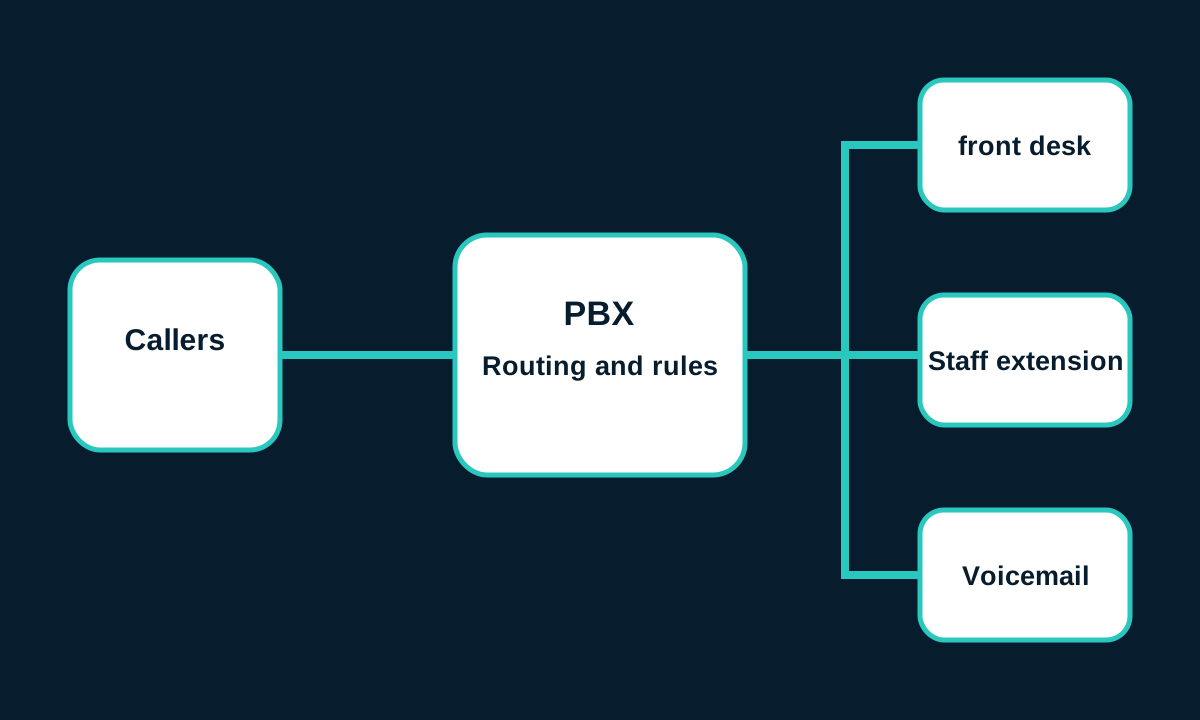
Treating PBX and VoIP as two completely opposite products will miss the point from the beginning. PBX answers ”who manages the calls”, VoIP answers ”how the voice is transmitted”.
- Call control:Numbers, extensions, permissions, routing, queues, recording and voicemail.
- Voice bearer:Analog lines, digital lines, or IP packets.
- Deployment location:Enterprise local, service provider cloud, or a combination of both.
For example, a company could keep an on-premises IP PBX while using SIP trunks to connect to external phone networks, or it could eliminate the on-premises call control server and use a cloud PBX instead. Both plans use VoIP, but have different liability boundaries and cost structures.
01 · Call management
What is a PBX and how does it work?
PBX is the abbreviation of Private Branch Exchange, which can be translated as private branch exchange system. It organizes the enterprise’s internal telephone into a unified system and connects internal users to the external telephone network according to the rules set by the administrator.
Cisco PBX Basics Instructionspoints out that a traditional PBX is responsible for managing incoming and outgoing calls, connecting to the public telephone network, and routing calls to the appropriate extensions. IP PBXs can handle both VoIP and traditional lines, and support IP phones or softphones.
- The call comes in.Initiate a call from an external number, switchboard number or internal short number.
- System identification rules.PBX checks times, numbers, permissions, queues and routing policies.
- Choose your destination.Calls are sent to an extension, voice menu, queue, voicemail, or external number.
- Keep and record.The system provides holds, transfers, conferencing, recording, logging and statistics.
extension
The short number of the internal user or device.
Automated attendant
Keystrokes or voice menus guide incoming calls.
call queue
Assign waiting calls to agents according to rules.
Voicemail
Save voice messages when no one answers.
The PBX itself does not dictate that external connections must use analog, ISDN, SIP, or other methods. The call control platform, outside line interface, terminal and license should be confirmed separately when purchasing.
02 · Voice transmission
What is VoIP and how does it work?

VoIP is the abbreviation of Voice over Internet Protocol, which transmits voice over IP network. This network can be an enterprise-controlled LAN, a private WAN, the public Internet, or a combination thereof.
According to RingCentral’s VoIP Instructions, the voice will be converted into digital data packets, transmitted through the network, and then restored to sound at the receiving end. VoIP systems can also interconnect with regular landline and mobile phone networks through gateways.
- Collection:The microphone converts the sound into digital audio.
- Encoding:Codecs compress audio and organize it into transportable data.
- Signaling:The system establishes, modifies or ends sessions; SIP is one of the common signaling protocols.
- Transmission:Voice packets travel through switches, routers, and network links.
- Play:The receiver buffers, sorts, decodes and outputs through the speaker.
VoIP does not equate to “just calling in an internet browser,” nor does it automatically mean cloud, encryption, unlimited calling, or full contact center functionality. The endpoint can be an IP desk phone, PC softphone, mobile application, conferencing device, or adapted analog device.
03 · Deployment model
Traditional PBX, IP PBX and Cloud PBX
| model | call control location | Common connections | Main management party |
|---|---|---|---|
| Traditional local PBX | Enterprise on-site hardware | Analog or digital carrier lines | Enterprise IT, maintainers and operators |
| Local IP PBX | Enterprise computer room or private environment | SIP trunk, gateway or hybrid line | Enterprise IT and Integrators |
| Hosted/Cloud PBX | Service provider platform | Enterprise Internet access service provider platform | Service providers and enterprise administrators are jointly responsible |
| Hybrid deployment | Exist locally and in the cloud at the same time | Multiple lines and site interconnections | Responsibilities must be defined on an item-by-item basis |
SIP Trunking is not a full hosted PBX. It typically provides external voice connectivity to an existing compatible PBX, while users, extensions, and routes are still managed by the existing PBX.SIP Trunking Documentation for 3CXAlso separate trunk configuration from the management of the PBX itself.
Cloud PBX isn’t “nothing on site” either. Offices still need reliable LAN, Internet, power supply, terminals and emergency contact solutions; the availability of the platform responsible for the service provider cannot guarantee that the enterprise’s local access link will always be normal.
04 · Actual comparison
What factors should be compared between PBX and VoIP?
A more accurate comparison would be between the three deployment models. The table below describes common trends and is not a substitute for supplier quotes, on-site evaluations, or contract reviews.
| factors | Traditional local PBX | Local IP PBX | Cloud PBX |
|---|---|---|---|
| upfront investment | Dedicated hardware and wiring may be expensive | Servers, Licensing, Networking and Terminals | Typically starts with an implementation fee and subscription |
| Ongoing costs | Lines, Maintenance and Spare Parts | Trunking, Licensing, Support and Operations | Users, numbers, features and usage subscriptions |
| degree of control | Strong local control, but functions are limited by the platform | Configuration freedom is usually high | Subject to service provider functions and contracts |
| Telecommuting | Often requires additional solutions | Achievable, but requires safe release and management | Often easier to support distributed users |
| Expansion | May involve boards and ports | Dependent on licensing, compute and network capacity | Usually activated on a per-user basis, but still subject to package restrictions |
| Local disconnection | Internal calls may continue, depending on outside line of sight | Local functionality may continue, SIP trunks may be disrupted | Local terminal may lose platform connection |
| power supply interruption | Still requires power from PBX, phone and line equipment | Servers, switches, routers and phones all need power | Local networks and terminals still need to be powered |
| Escalation Responsibility | Enterprise or maintainer | Enterprise or integrator | The service provider is responsible for the platform, and the enterprise is responsible for the terminal and local network. |
05 · Life cycle cost
Which option is cheaper in the long run?
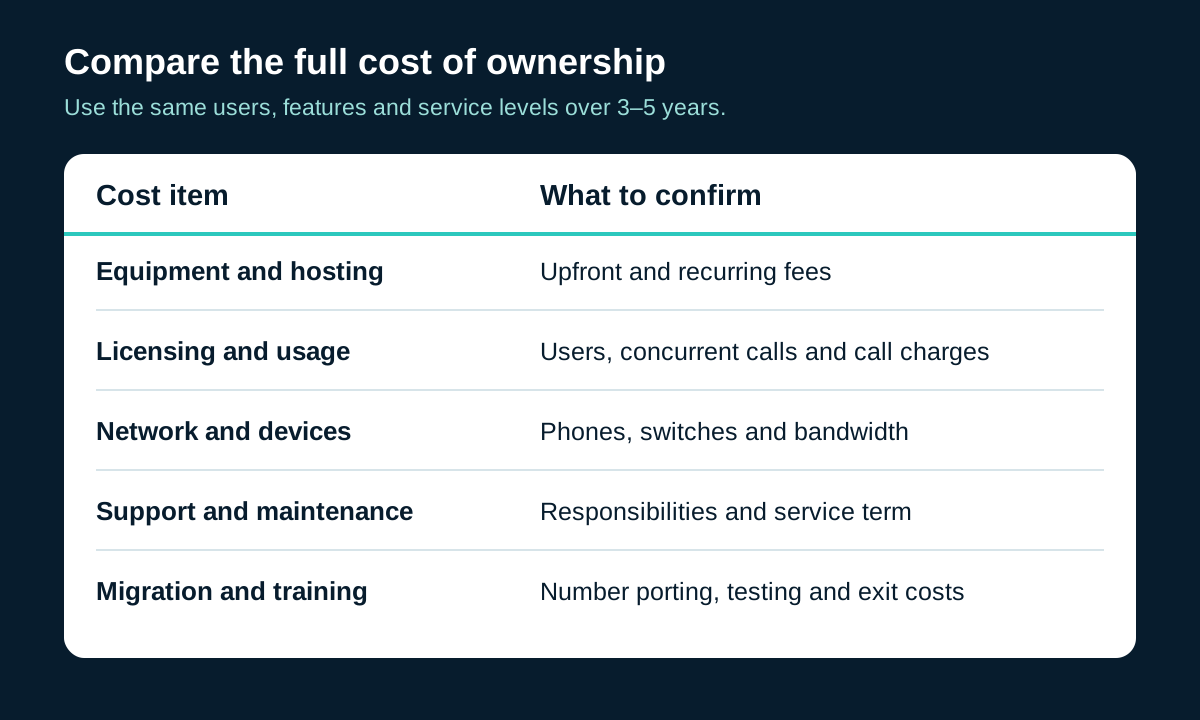
No one option is cheaper for all businesses. It makes sense to put the costs that will be incurred over 3 to 5 years on the same worksheet, using the same number of users, numbers, call ranges, features, and service levels.
| cost item | Things that are easy to miss | Check method |
|---|---|---|
| Platform and Licensing | Basic version does not include queues, recordings, analytics or APIs | Quotation based on necessary functions, not just the lowest package |
| terminal | Phones, headsets, conferencing equipment, ATA and backup units | Check supported models, firmware and warranty |
| Network | PoE switches, routers, firewalls, cabling and secondary links | Do capacity and quality assessment first |
| Numbers and calls | Number monthly rental, portability, international, mobile and special destinations | Estimate using real bill |
| implement | Design, configuration, integration, training, and migration windows | Required scope of work and acceptance conditions |
| Operation and maintenance | Internal hours, support contracts, upgrades, monitoring and spare parts | Clarify corporate and supplier responsibilities |
| exit cost | Early termination of contract, number transfer, data export and equipment disposal | Review exit clauses before signing |
Simplified formula:total cost of ownership = Initial equipment and implementation + contract period subscription and lines + network transformation + operation and maintenance support + migration risk + exit cost.
The purchase price of an existing PBX is a sunk cost, but the maintenance, wiring, spare parts and business risk required to continue using it are still future costs. Cloud PBX monthly per-user rates are easy to compare, but may not include numbers, calling, compliance recording, contact center or advanced integrations.
06 · How to work
Functionality, teleworking and system integration

Modern platforms often put desktop phones, computer softphones, and mobile applications under the same user identity, but ”supporting a certain function” does not mean that all licenses, regions, and terminals can use the same capability.
| demand | Issues that should be confirmed | Common limitations |
|---|---|---|
| remote user | Do you need a VPN, border controller or dedicated app? | Home networks and endpoints are not fully controlled by the enterprise |
| Automated attendant | Are tiers, opening hours, language and holiday rules adequate? | Complex menus may be part of premium packages |
| Queues and reports | Need real-time monitoring, historical reporting, or a complete contact center? | Regular PBX queues don’t equal contact centers |
| CRM integration | Is it pop-up, click-to-dial, call recording or automated workflow? | May require APIs, connectors, or third-party services |
| Recording | How are storage locations, retention periods, access controls and notifications handled? | Legal requirements vary by region and use |
| mobile application | Do caller ID, push notifications, network switching and device management meet the requirements? | Experience depends on mobile system and data connection |
Don’t just look at the function name. Require suppliers to demonstrate actual business processes: how customer calls are put into the queue, how to handle when no one answers, how remote employees call back, how records enter the CRM, and how administrators export reports.
07 · Voice experience
Call quality, reliability and outage planning

VoIP quality is determined by more than just Internet bandwidth. Latency affects the rhythm of conversations, jitter indicates unstable packet arrival times, packet loss causes missing or distorted sound, and congestion may worsen both of these indicators.
Microsoft’s Live Media QoS GuidelinesNote that QoS can prioritize latency-sensitive traffic in a controlled network; however, enterprises cannot control all segments of the public Internet.Call Quality Review GuideIt also emphasizes that client, network and service data positioning issues should be combined.
| question | hearing or performance | Directions for improvement |
|---|---|---|
| high latency | It is easy for both parties to compete for words, and the response seems slow. | Shorten paths and check routing, VPN and congestion |
| Jitter | Audio is choppy or the rhythm is erratic | Troubleshooting Wi-Fi, queues, and link fluctuations |
| Packet loss | Missing words, robotic sounds or brief silence | Check physical links, wireless interference and congestion |
| terminal problem | Echo, too small a microphone, or one-way audio | Check headset, firmware, NAT and media paths |
An outage plan should include at least
- Primary link and independent backup link to avoid common points of failure.
- UPS power for routers, switches, PBX, phones and optical modems.
- Mobile phone transfer or backup number when the platform is unreachable.
- A practical test of local survivability and emergency call procedures.
- Upgrade contact form for service providers, carriers and internal IT.
Traditional PBXs are also subject to power outages, line outages, and hardware failures; on-premises deployments don’t automatically equal more reliability. The platform availability announced by cloud service providers cannot replace the planning of office networks, terminals, and power supplies.
08 · Boundaries of Responsibility
Who bears the responsibility for safety and management?
Phone systems often include address books, call logs, recordings, voicemail, administrator accounts, and billing privileges. Whether on-premises or in the cloud, it needs to be clear who is responsible for identity, configuration, patching, logging, endpoints and incident response.
Businesses are usually responsible for
- User activation and resignation deactivation
- Strong passwords and multi-factor authentication
- Terminals, LANs and Firewalls
- Privilege minimization and abnormal fee checking
- Recording and Privacy Policy
Supplier should state
- Platform encryption and key ranges
- Data location, retention and deletion
- Patching, backup and disaster recovery
- Administrator logs and security alerts
- Incident Notification and Support Process
VoIP does not automatically equal end-to-end encryption. Signaling, media, stored recordings and management portals may be protected differently. When purchasing, you should ask which links are encrypted, who can decrypt it, whether the terminal supports it, and what protections no longer extend after the public telephone network is interconnected.
On-premises deployment is not automatically more secure either. Serious risks may also arise if the old system is not patched for a long time, the management port is exposed, the default password is not changed, or the remote maintenance account is out of control.
09 · Scene matching
Which phone system is better for your situation?
| business situation | Priority assessment direction | Must check |
|---|---|---|
| Single office, old lines stable | Continue using or upgrade existing PBX in stages | Outage risk, spare parts, maintenance and future line support |
| Unified management of multiple sites | IP PBX, Cloud PBX or hybrid plan | Cross-site networking, numbering plans and permissions |
| More remote employees | Hosted service or securely published IP PBX | Home network, application experience and terminal management |
| Strong customization and native integration | IP PBX with high controllability | APIs, upgrade impact, and internal technical capabilities |
| Limited IT staff | Cloud PBX with clear management responsibilities | Support scope, contract, exit and data export |
| Special analog equipment is still in use | Hybrid deployment or gateway transition | Fax, access control, alarm, elevator and emergency line compatibility |
Pre-purchase selection list
- Users, sites, numbers and peak number of concurrent calls.
- Equipment, wiring, recording and integration capabilities must be retained.
- Target country’s number, emergency calling, privacy and recording requirements.
- Local network, power, Internet and backup link status.
- Management work that an in-house team can take on over the long term.
- Vendor SLAs, support hours, renewals, price increases, and exit terms.
10·Implementation sequence
How to migrate from traditional PBX to VoIP?

- Take stock of the current situation.Record numbers, extensions, lines, agents, equipment, recording, fax, access control and other special terminals.
- Define requirements.Differentiate between must-have functionality, desired functionality, and legacy processes that can be eliminated.
- Check the network.Evaluate LAN, WAN, Wi-Fi, PoE, NAT, firewall, QoS, bandwidth and backup links.
- Check the numbers.Confirm portability qualifications, account information, expected window and fallback path with the old and new service providers.
- Verify the device.Confirm the model, firmware, power supply, and support status of phones, headsets, conferencing equipment, and ATAs.
- Conduct a pilot.First select a small number of users and real business processes to test quality, routing, recording, applications and emergency calls.
- Train users.Provide brief operating instructions, fault reporting methods, and contact person on switching day.
- Switch in stages.Monitor calls, queues, number presentation, billing and integration, retaining proven fallbacks.
- Retired after acceptance.Confirm that all numbers have been transferred correctly, data has been saved, and bills have been verified before canceling the old service.
Do not cancel the old line until number porting and inbound testing are complete. Migration time cannot be estimated based on a fixed number of users alone, as number portability, complex integrations, cross-border sites and special equipment can all change the timeline.
ATA can allow some analog devices to connect to IP environments, but it is not a universal compatibility guarantee. Fax, alarm, access control and elevator phone calls should be confirmed by the corresponding equipment supplier and local service requirements.

FAQ
PBX and VoIP FAQ
Quickly clarify the most confusing concepts when it comes to procurement and migration.
Are PBX and VoIP the same thing?
No. PBX is a phone system that manages corporate extensions, call routing, transfers, voicemail and other functions; VoIP is a technology that carries voice over IP networks. Businesses can use a traditional PBX, a VoIP-enabled IP PBX, or a cloud PBX managed by a service provider.
Can VoIP be used with the PBX?
Yes. IP PBXs handle voice over IP natively; some traditional PBXs can also connect to VoIP services through gateways or SIP trunks. Compatibility depends on PBX model, licensing, interfaces, codecs, SIP implementation and provider certification.
Does VoIP have to be deployed in the cloud?
uncertain. VoIP simply means that voice is transmitted over an IP network. Servers can be located in enterprise data centers, service provider data centers, or hybrid environments. Both on-premises IP PBXs and cloud PBXs may use VoIP.
Do I still need PBX functionality with hosted VoIP?
Still required, but PBX functionality is typically provided by the provider platform. Administrators configure users, numbers, auto-attendants, queues, and policies through a web portal without having to maintain core PBX servers in the office.
What is the difference between SIP Trunking and Hosted PBX?
SIP trunking mainly connects existing compatible PBXs to voice service providers; hosted PBXs have the service provider running the call control platform. The former retains more local system responsibilities, while the latter leaves the core platform operation and maintenance to the supplier.
Is VoIP necessarily cheaper?
uncertain. Results depend on subscriber count, numbers, call destinations, equipment, network upgrades, integrations, implementation, support and contract conditions. A low subscription unit price does not mean a lower full life cycle cost.
Can I keep my original phone number when migrating?
Number portability is supported in many regions, but number type, existing carrier, account information, regional rules and service provider coverage will all affect the results. The portability scope and completion status must be confirmed in writing before the old service is cancelled.
Can I continue to use my existing desk phone?
It’s possible, but not the default. Check the phone model, firmware, SIP compatibility, power supply, codecs and provider support list. Analog phones can be accessed via ATA, but functionality and quality may be limited.
What happens to VoIP when the Internet goes down?
External calls relying on this connection may be interrupted. Impact can be reduced through dual-carrier links, mobile network backup, call forwarding, local survivability, UPS, and written emergency procedures, but no single measure equals zero disruption.
Can VoIP make calls to regular mobile phones and landlines?
Usually yes, but you need to connect to the public telephone network through a voice service provider or gateway. Dialable areas, rates, number display, emergency calls and regulatory requirements depend on the plan, country and service provider.
Summary
Choose a deployment model that meets your needs
- PBX is a call management system and VoIP is voice over IP transmission technology.
- The real options are usually traditional PBX, on-premises IP PBX, cloud PBX or a hybrid deployment.
- Costs should be compared on a full lifecycle basis, rather than just looking at hardware or per-user monthly charges.
- Call quality depends on the platform, local network, terminal, Internet path and operation and maintenance.
- The safest migration starts with inventory, pilots, number verification, and contingency plans.
If existing systems remain stable and business changes are few, a phased upgrade may be more appropriate; if multi-site, remote working, and centralized management are required, IP or cloud deployments are often more worth evaluating. The final decision should come from validated business needs and responsibility boundaries, not a single technology label.
Reader questions
Still have questions about PBX or VoIP?
Please describe your existing system, number of users and sites, target functionality, and deployment methods you wish to compare. This form is for communication about article issues. Please do not fill in passwords, administrator credentials, or other sensitive data.

Follow-up articles
Related Corporate Communications Topics
The following content has entered the editorial plan and no fictitious links will be provided before official release.
What is the difference between SIP Trunking and Cloud PBX?
Compare connection boundaries, management responsibilities, device reuse and applicable scenarios.
Enterprise VoIP Network Preparation Checklist
Check switches, PoE, QoS, Internet, backup and monitoring.
Common Risks of Legacy PBX Migration
Check numbers, terminals, special equipment, switching windows and fallback plans.