
Network Security · Packet Walkthrough
Stateful vs Stateless Firewall: What Happens to the Reply?
A stateful firewall uses connection state to recognize replies to a permitted, tracked flow. A stateless firewall checks each packet independently, so the return direction must match an allowed rule.
That difference explains why an outbound HTTPS request can pass while its reply is dropped. Follow the same TCP handshake through both controls, then apply the result to AWS security groups and network ACLs.
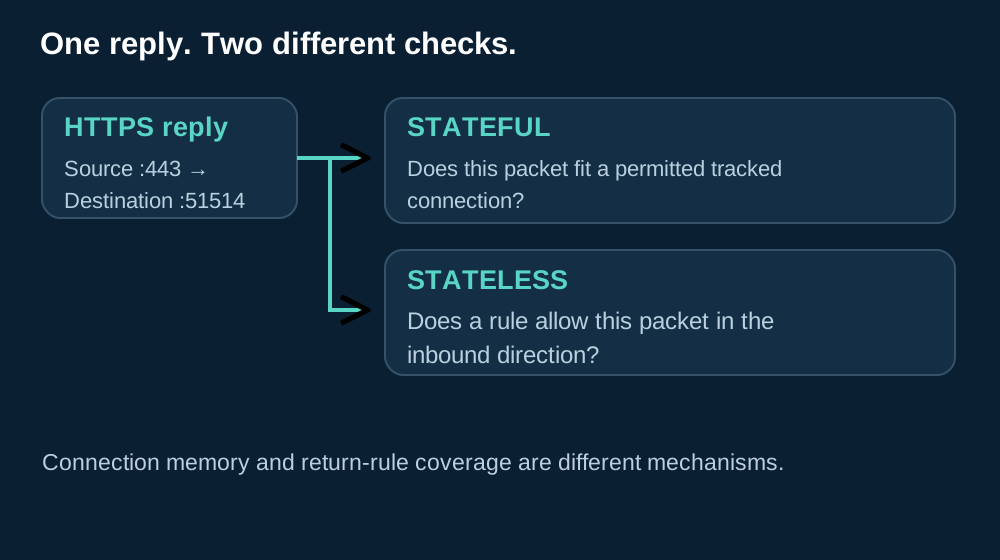
At a glance
Quick Reference
| Question | Stateful | Stateless |
|---|---|---|
| What does it check? | Packet information plus tracked flow context | The current packet against configured rules |
| What permits a reply? | A valid match to a permitted tracked flow | An applicable rule for the return direction |
| A familiar example? | AWS security group | AWS subnet network ACL |
Overview
What Does a Firewall Remember?
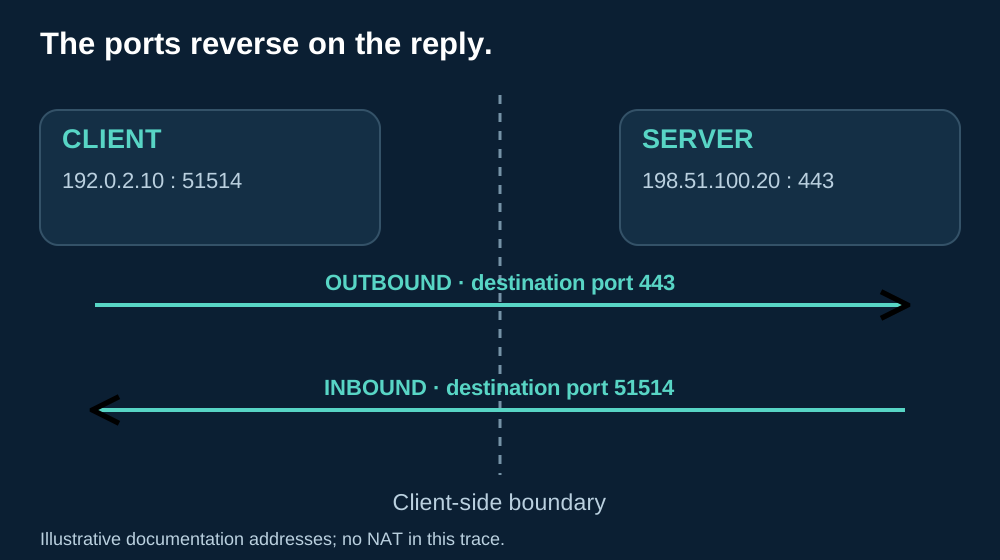
A laptop opens an HTTPS connection to a web server. The client uses 192.0.2.10:51514; the server listens at 198.51.100.20:443. These are documentation addresses, not targets to contact.
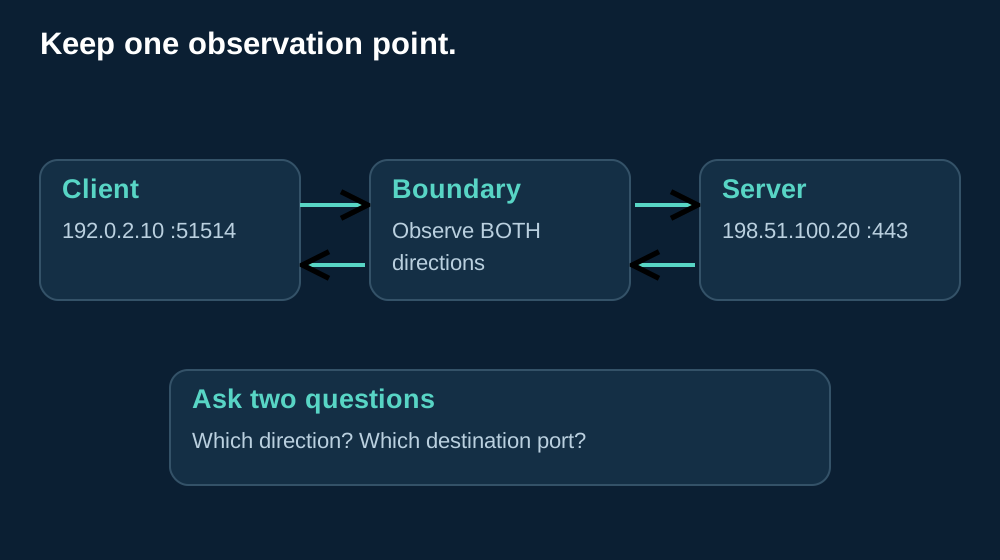
For this article, the firewall sits at the client’s network boundary. Outbound means leaving that boundary toward the server; inbound means returning through it toward the client. We keep that viewpoint even when discussing the server’s response.
| Term | Meaning in this example |
|---|---|
| Packet | One IP-carried unit, such as the client’s TCP SYN or the server’s SYN-ACK. |
| Flow | Traffic associated with endpoints and a protocol, with the reverse direction related to that conversation. |
| State table | Temporary records a firewall uses to associate packets with a tracked flow and its progress. |
| Ephemeral port | The temporary client-side port, here 51514, selected for this connection rather than the server’s listening service. |
On the reply, the endpoints exchange roles: the source becomes 198.51.100.20:443, and the destination becomes 192.0.2.10:51514. The service still uses HTTPS, but the reply’s destination port is no longer 443.
If an inbound packet comes from port 443, how can the firewall tell whether someone inside asked for it? That is the question connection tracking helps answer.
The Packet Walkthrough
How the Two Firewalls Handle the Same Traffic
The following walkthrough holds the client and server constant so that only the filtering decision changes. Read the arrows from the client’s boundary; the packet table later separates a successful tracked handshake from an initially blocked stateless attempt.
01 · One Question at a Time
How a Stateful Firewall Recognizes a Reply
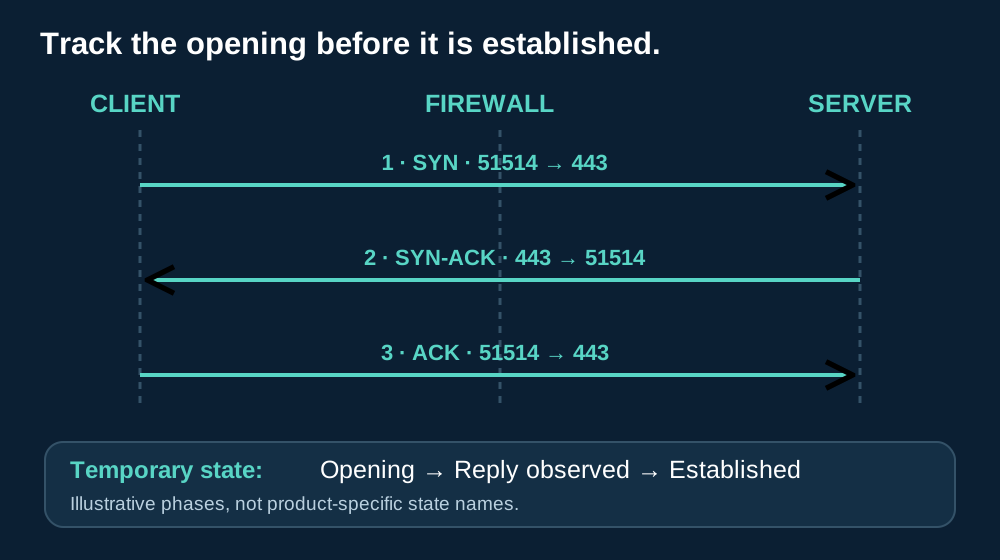
Stateful filtering adds a temporary memory of the conversation to the packet check. The first outbound packet must still satisfy policy; tracking is not permission to start an otherwise forbidden connection.
Follow the handshake from the client’s boundary. The state names are illustrative; products use their own checks and timers. RFC 9293 describes TCP connection establishment.
- SYN, outbound. The client sends from 192.0.2.10:51514 to 198.51.100.20:443. After the policy permits the attempt, the firewall can create a record while the connection is still being opened.
- SYN-ACK, inbound. The server reverses the endpoints. The firewall can match that reply to the pending record and check whether it fits the expected TCP progress, before the handshake is fully established.
- ACK, outbound. The client acknowledges the server’s response. Tracking can move the conversation into an established phase; subsequent packets are assessed in that context.
| Source IP | Source port | Destination IP | Destination port | Protocol | Current state |
|---|---|---|---|---|---|
| 192.0.2.10 | 51514 | 198.51.100.20 | 443 | TCP | Opening; SYN seen |
The record links both directions, even if the interface displays only the original direction. A valid SYN-ACK does not need an already completed handshake behind it: it needs an eligible opening attempt and the checks required by that implementation.
When the connection closes, the firewall processes the closing sequence and eventually removes the entry. An idle or incomplete attempt can also expire; resource limits or administrative actions may remove tracking sooner.
After removal, a late packet cannot rely on that old entry. The next decision follows the current rules and tracking behavior, which may discard a reply that would have matched moments earlier.
A traffic log serves a different purpose: it records selected events for later investigation. A log entry saying that yesterday’s SYN passed does not prove that a matching state record is alive now.
Use the full endpoint-and-protocol combination when investigating. Another browser tab reaching the same server can use a different client port and a separate tracking record; matching only the server address or the word HTTPS can join unrelated attempts.
The important distinction is connection context, not a promise to inspect application files. Check Point explains packet-header checks and connection history.
02 · One Question at a Time
How a Stateless Filter Evaluates Each Packet

A stateless filter does not consult a remembered conversation when deciding about the next packet. It compares the available packet fields with the rules that apply at this interface and in this direction.
Typical criteria include source and destination addresses, the IP protocol and transport ports. Some filters can also match TCP flags. Exactly which fields are configurable depends on the product; a generic ACL example is not a configuration command for every platform.
| Direction | Example packet | Criteria the return policy must distinguish |
|---|---|---|
| Outbound request | 192.0.2.10:51514 → 198.51.100.20:443, TCP SYN | Client source, permitted server destination and destination service port 443 |
| Inbound reply | 198.51.100.20:443 → 192.0.2.10:51514, TCP SYN-ACK | Permitted remote source and client destination, with the applicable destination client port |
Under default deny, an outbound allowance alone does not make this reply pass. If no inbound rule covers the returning packet, it is dropped even though the request crossed successfully. The server and client can both be functioning correctly while that one directional check fails.
An existing inbound rule might already cover the return traffic. Stateless operation does not require an administrator to create a new rule for every connection; it requires adequate standing rules for the traffic the organization intends to permit.
For example, a rule may cover approved remote addresses and a documented client port range. Whether it can additionally constrain a source service port depends on its capabilities. Keep the rule’s actual match fields distinct from the packet fields shown in a trace.
Where TCP-flag matching exists, requiring ACK can narrow a category of packets. An ACK bit is still just information in this packet: it does not demonstrate that this filter previously saw the initiating SYN or knows which application requested the traffic.
The packet-by-packet distinction is also described in Fortinet’s stateful and stateless overview.
03 · One Question at a Time
Packet Walkthrough: Why an Allowed HTTPS Request Can Still Time Out
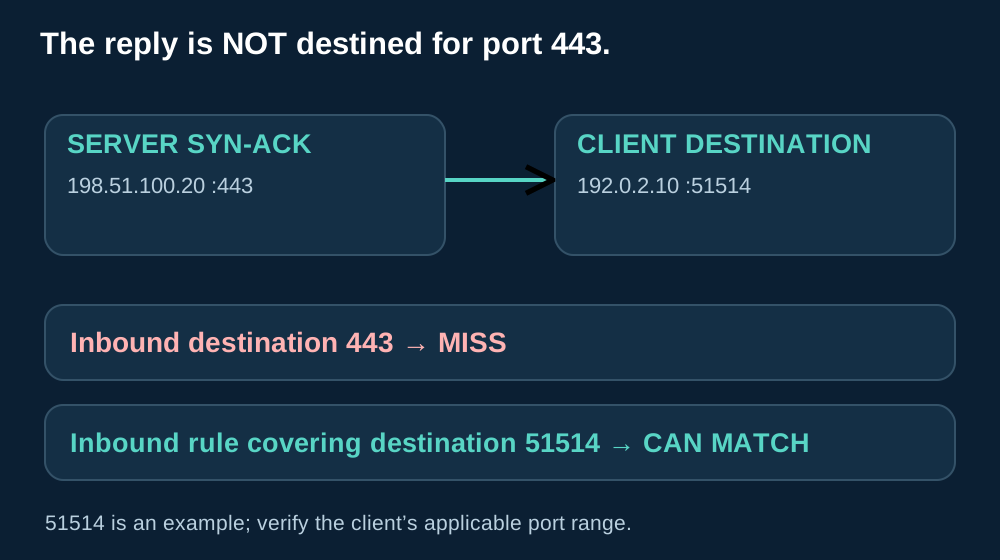
Assume one client-side firewall sees both directions, the initial outbound connection is permitted and unmatched traffic is denied. There is no NAT or intermediate proxy in this simplified trace. In the stateless case, begin without any matching inbound allowance.
These are two separate timelines. The stateful control can complete the first handshake. The stateless control drops the first SYN-ACK, so that first attempt has not yet established a connection.
| Event | Source | Destination | Stateful verdict | Stateless verdict | Reason |
|---|---|---|---|---|---|
| 1. Initial SYN | 192.0.2.10:51514 | 198.51.100.20:443 | Permit; track opening | Permit | The outbound policy covers the requested service. |
| 2. Server SYN-ACK | 198.51.100.20:443 | 192.0.2.10:51514 | Permit if it matches pending state | Drop | No stateless inbound allowance matches the client destination port. |
| 3. Initial client ACK | 192.0.2.10:51514 | 198.51.100.20:443 | Permit; handshake completes | Not sent for this dropped SYN-ACK | The stateless client has not received the required response. |
| 4. Fresh SYN after return policy is corrected | 192.0.2.10:51514 | 198.51.100.20:443 | A separate eligible attempt | Permit | The new controlled test reuses the illustrative endpoints. |
| 5. Fresh SYN-ACK | 198.51.100.20:443 | 192.0.2.10:51514 | Permit for its new matching state | Permit | The corrected inbound policy now covers this reply. |
| 6. Fresh final ACK | 192.0.2.10:51514 | 198.51.100.20:443 | Permit | Permit | The stateless handshake can now finish. |
The repeated rows are a separate controlled test after the earlier tracked connection has closed and the tuple can be reused. A real fresh attempt may select a different ephemeral port. The table deliberately keeps 51514 to make the reversal easy to inspect; capture the new tuple rather than assuming your next test will reuse it.
Adding another client-side inbound allowance for destination port 443 misses the demonstrated reply. Here, 443 is its source port. The destination is 51514 on the client, so a destination-port condition must match that client-side value or the intended range containing it.
- Find the last packet seen on each side. Compare a client-side capture with a capture or log at the boundary and server. Associate packets by addresses, ports, TCP progress and time; a server-side SYN-ACK alone does not show that the client received it.
- Inspect the applicable decision. For a stateful control, find the live record for this attempt. For a stateless control, follow the rules in the applicable direction, including an earlier deny and the default action.
- Repeat with a fresh connection. Apply the smallest justified change, capture its exact tuple and verify SYN, SYN-ACK and ACK. Then check the application exchange; a successful handshake alone does not establish that TLS or the HTTP request succeeded.
If the SYN-ACK passes but the page still times out, continue forward through the trace. A later retransmission, reset, TLS failure or application timeout points to a different stage than the missing return allowance demonstrated here.
04 · One Question at a Time
AWS Example: Security Groups and Network ACLs

Now make the HTTPS client an EC2 instance. A security group is associated with its network interface, while a network ACL is associated with the subnet. The client-boundary perspective remains unchanged: the instance initiates the outbound request, and the server’s response is inbound.
| Question | Security group | Subnet network ACL |
|---|---|---|
| Where does it apply? | Associated network interfaces / instance traffic | Traffic entering or leaving the associated subnet |
| Which rule actions? | Allow rules | Allow and deny rules |
| How are rules evaluated? | Applicable allow rules are considered together; no numbered first-match deny | First matching rule in ascending rule-number order |
| What about the reply? | For an eligible tracked connection, matching response traffic can pass without a separate inbound allowance | Inbound and outbound are checked independently; the reply needs an allowance |
Those are AWS-specific behaviors. AWS compares security groups and network ACLs. A permission at one layer does not cancel a denial at the other; both applicable controls must let the packet through.
In the worked failure, the instance’s security group and subnet ACL both allow the outbound connection to server port 443. Tracking permits the response through the security group, but the subnet ACL has no inbound rule covering the reply’s destination client port. That layer drops the SYN-ACK.
The missing allowance is inbound at the client subnet, for the relevant TCP destination ephemeral port range, with an appropriate remote source scope and rule number. An inbound destination-port-443 rule describes a different packet. In AWS network ACL rules, the TCP/UDP port range is the destination-port range; do not copy generic source-port or TCP-flag matching assumptions into this control.
Select the range for the client actually initiating the connection. AWS documents that client operating systems and intermediaries can use different ranges; the instance acting as client needs inbound coverage for its applicable range. AWS explains ephemeral-port selection and return directions. Use the actual addresses visible at the ACL when translation or a load balancer changes the path.
Security-group connection tracking also has documented exceptions and limits. Broad bidirectional rules can produce untracked flows, and response handling then depends on the applicable rules. The example here specifically concerns an eligible tracked flow, not every possible security-group configuration. AWS documents tracked and untracked connections.
For a change review, capture the associated security groups, the subnet’s actual ACL association and the ordered ACL entries. Inspect the intended instance and subnet, not a similarly named resource; correct rules on an unused ACL cannot repair this path.
05 · One Question at a Time
Which Approach Fits Your Traffic?
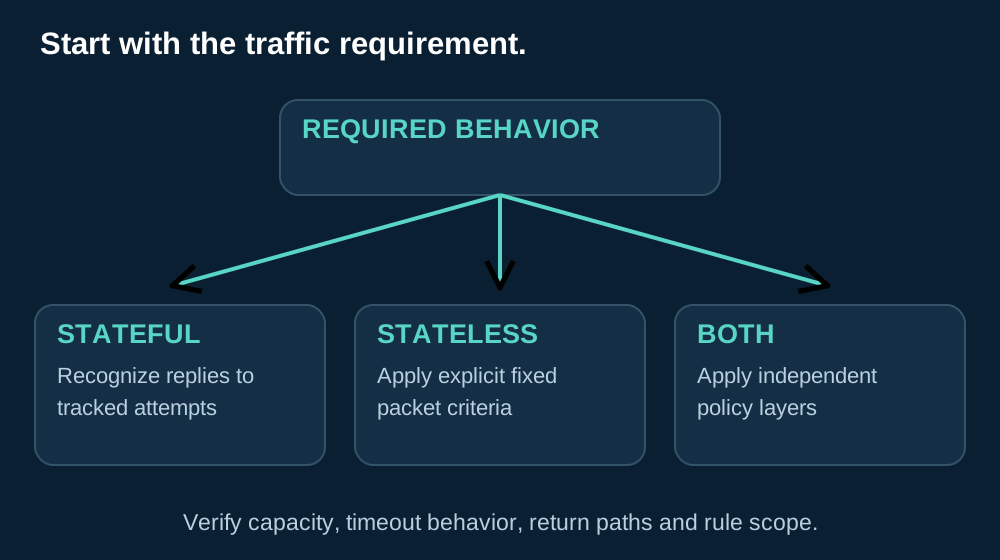
Choose from the traffic requirement, the control’s capabilities and the operating process. A stateful label does not make every application safe, and a stateless label does not make a particular workload faster by definition.
| Traffic requirement | Suitable approach | Reason | What to verify |
|---|---|---|---|
| Client-initiated sessions with changing return ports | Stateful control | Relates eligible replies to permitted tracked attempts | Tracking capacity, timers and both directions’ path |
| Subnet-wide block on a known source range | AWS subnet network ACL, where appropriate | Provides an explicit deny at the subnet boundary | Association, source scope, rule order and collateral impact |
| High-volume packet filtering with fixed criteria | Stateless filter can be suitable | Applies explicit packet criteria without a per-flow state requirement | Actual packets per second, packet sizes, rule costs and required return coverage |
| Cloud workload using both controls | Layered security groups and subnet ACLs | The controls answer different scope and policy questions | Each direction at both layers, with independent deny/allow decisions |
Stateful controls need resources for concurrent tracked flows. Many short attempts and many long-lived idle connections stress different parts of that resource budget. An opening-attempt burst can matter even when average bandwidth looks modest.
Stateless operation moves attention toward ruleset coverage and change discipline. A new permitted service may need a corresponding return policy; an old broad allowance may cover more destinations than its owner intended. Review both directions together.
Connection tracking, ruleset maintenance and hardware implementation all affect the operational trade-off. ConnectWise discusses the different operating models. Compare the behavior your workload needs rather than adopting a vendor’s general speed or security ranking.
- Packets per second: test the actual packet-size mix, rule path, direction and enabled inspection features.
- New connections per second: measure the rate of opening attempts and completed establishments, with the same success criteria.
- Concurrent connections: check how many flows remain tracked under the real session duration and idle behavior.
Record drops, latency and resource pressure alongside those measurements. Keep the software version, policy and test method comparable; a throughput figure collected without optional inspection cannot stand in for a different enabled configuration.
An idle timeout can remove the entry while an application still believes the session exists. The next packet then encounters a control without the remembered context it previously used. Check the relevant timers and application behavior instead of assuming that “established once” means permitted forever.
Asymmetric routing creates another context problem: the request may cross one device and the reply another. Unless the design provides the needed shared or synchronized state, the second device may not know the flow. Validate the platform’s supported design rather than assuming two devices automatically share a table.
For example, an allowed HTTPS server can return harmful content inside the connection. Recognizing its tracked TCP flow neither decrypts TLS nor inspects that file. Content inspection needs an appropriate additional capability, such as permitted TLS inspection with relevant threat inspection, an application proxy, or endpoint inspection after decryption.
Check visibility, application support and approved privacy and trust arrangements. For appliance selection, the Huawei firewall guide covers model identification, software licensing and inspection requirements; verify those capabilities for the exact model and version.
Questions and Answers
Frequently Asked Questions
Can a firewall track UDP even though UDP has no handshake?
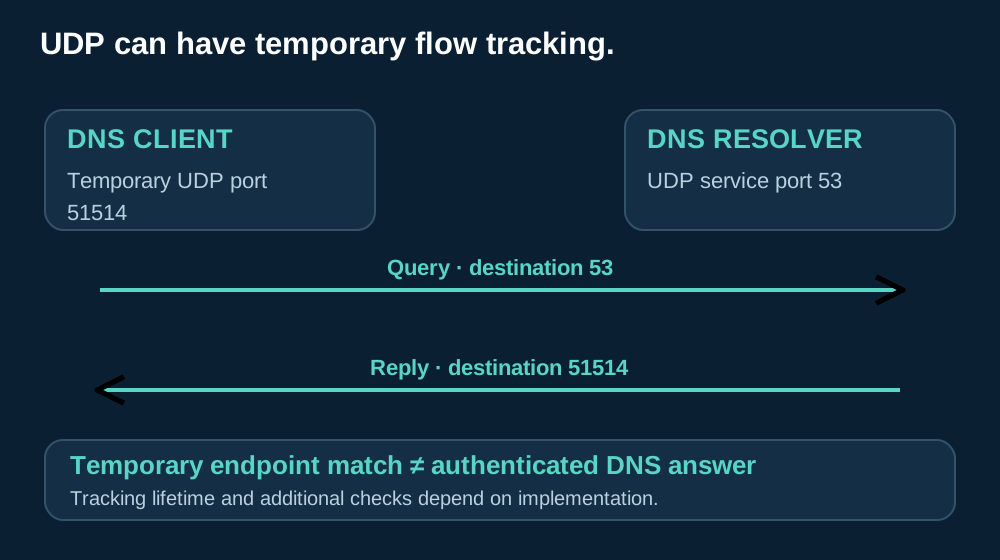
Yes. A firewall can temporarily associate a UDP DNS query with its endpoints and protocol, then match the reversed endpoints of a reply.
UDP has no TCP-style handshake. Tracking timers and additional checks depend on the implementation; a matching flow does not authenticate the answer.
Resolver trust and DNSSEC validation address separate questions.
Does an ACK flag prove that a packet belongs to an established connection?
No. An ACK bit is a field in the current TCP packet, not proof that this filter observed the opening handshake.
A stateless filter may match that bit where supported, but it still has no remembered flow to compare. Verify the actual policy and live tracking record rather than treating ACK as evidence that the connection is legitimate.
What happens if a reply arrives after the state entry expires?
It cannot rely on the expired record. Depending on the policy and implementation, the firewall may drop it or apply other rules.
Compare the application’s idle period with the tracking timer and inspect the live tuple at the failing control. A historical allow log is not proof of current state; extending timeouts also affects tracking capacity.
Why might a connection fail when the request and reply take different routes?
A return-path firewall may never have seen the initiating packet. A SYN crossing device A does not automatically create state on device B.
Check both routes, failover behavior and any supported state synchronization. An alternate path can also encounter a different stateless ACL, so inspect its association and ordered rules before blaming tracking alone.
Does a stateful firewall inspect the contents of HTTPS traffic?
Not simply because it is stateful. A tracked TCP connection can carry encrypted, harmful content that the connection-state check cannot inspect.
Determine where TLS is decrypted and what additional inspection can see the payload. A successful state match alone does not validate a website, its certificate or a downloaded file.
How can NAT change the addresses and ports I need to check?
NAT can rewrite an address or transport port between observation points. Capture the tuple visible at each filtering boundary and relate the original and translated directions using the platform’s translation records.
Do not copy the client’s private tuple into a rule evaluated after translation. The base walkthrough excludes NAT so that its endpoint reversal remains easy to follow.
Take It to Your Trace
What to Check When a Reply Goes Missing
In the opening example, the stateless reply timed out because the client-side inbound policy did not cover the returning SYN-ACK; a valid tracked attempt could pass the stateful control.
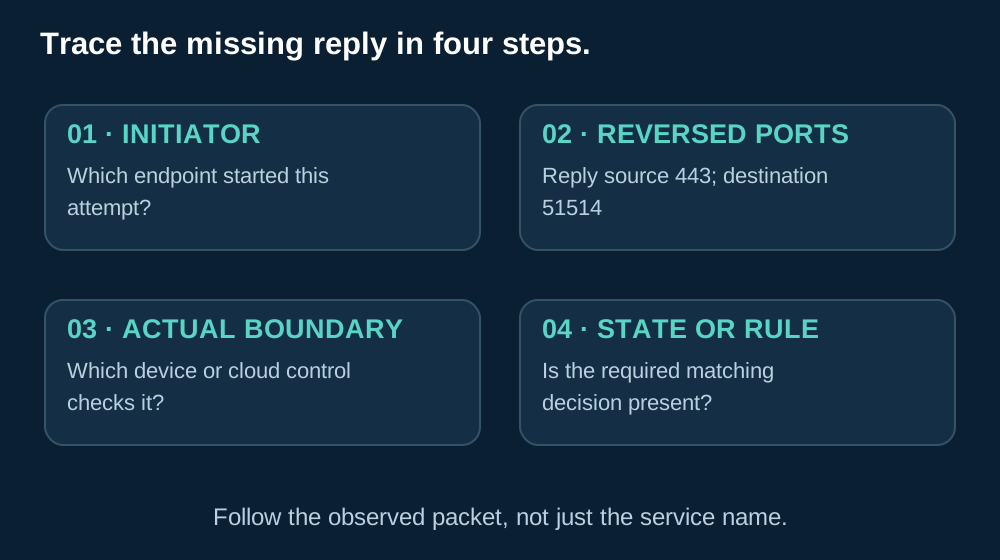
Work from the packet that disappeared rather than from the service name. Use this short checklist at the actual filtering boundary:
- Which endpoint initiated the flow? Identify the client and the exact attempt.
- What are the reply’s source and destination ports? Read them from the observed packet.
- Which control evaluates that direction? Include each applicable device, security group or subnet ACL.
- Is there live state or a matching rule there? Verify the actual record or directional decision.
Then repeat a fresh test and follow it beyond the handshake if the application still fails. The client sent to port 443, but the server replied to port 51514. That reversal explains where to look for the failed check.
Talk to KRLINK
Ask a Firewall Question
Describe the connection you expected to work and the packet or log entry where the result differed.

Include the model, software version and a redacted packet example where helpful. Keep credentials and private production configurations out of the request.
Keep Reading
Related Articles
Huawei Firewalls: Features, Models and Selection Guide
Explore appliance capabilities, TLS visibility, licensing and the checks needed when choosing a Huawei firewall.

How VoIP Works: From Voice Encoding to Internet Calls
Follow signaling and voice media to see why communication paths and packet handling matter beyond web browsing.

What Is Telecom Equipment? Types and Examples
Place firewalls, routers and switches within the wider network equipment used to carry communications.